Showing posts with label Apple. Show all posts

Should Uber Add Camera Warnings for Drivers?

Uber app navigation
The Uber Navigation Should Warn Drivers About Photo Enforced Locations

As ride-hailing becomes more prominent in urban transportation, the safety and legal risks for drivers are under increasing scrutiny. One debated feature is whether Uber (or similar platforms) should provide in-app alerts for photo enforcement such as speed cameras, red-light cameras, and bus-lane cameras. In other words: should Uber drivers see “you are approaching a photo enforcement zone” warnings built directly into their Uber Driver app? While navigation apps like Waze already provide this type of alert, Uber has yet to integrate such a feature. The question raises many pros, cons, and practical challenges.

Photo enforcement refers to the use of fixed or mobile cameras and sensors to detect traffic violations automatically, including speeding, running red lights, bus-lane violations, and toll infractions. These systems are widespread in many jurisdictions, and studies have shown they can reduce crashes and fatalities at camera locations. Because they are automated and ubiquitous, they represent a consistent legal risk for drivers in terms of ticketing, fines, and sometimes license points. For full-time rideshare drivers spending hours on the road daily, even one or two violations can have significant financial and reputational consequences.

The arguments in favor of in-app enforcement warnings are strong. First, warnings could reduce liability and help drivers avoid costly mistakes. Second, they could build trust and goodwill between Uber and its drivers, showing that the platform is serious about supporting its workforce beyond ride matching. Third, Uber has already rolled out many safety features such as ride check, driver emergency support, and GPS tracking. Adding enforcement alerts would fit within this broader safety ecosystem. Fourth, warnings could encourage more cautious driving, creating safer conditions for passengers, pedestrians, and other vehicles. Finally, the feature could serve as a competitive differentiator, encouraging drivers to stick with Uber over competitors.

However, there are also several challenges. Legally, in some regions, warning drivers about enforcement tools is restricted or even prohibited. Uber would need to carefully navigate this patchwork of regulations to avoid regulatory backlash. Data accuracy is another hurdle. Cameras are frequently moved, added, or decommissioned. If Uber issued incorrect warnings, drivers might slam on the brakes unnecessarily or, worse, assume there are no cameras when one is present. Liability concerns arise if Uber is seen as partly responsible for inaccurate alerts. User interface issues are also relevant—too many alerts could distract drivers, conflicting with navigation and passenger instructions. Operationally, acquiring and maintaining accurate enforcement data across thousands of jurisdictions is expensive and complex. Finally, there is the risk of public perception: authorities might accuse Uber of helping drivers “game” the system rather than encouraging compliance.

If Uber chose to implement this feature, several best practices could help ensure effectiveness and safety. Verified and frequently updated data sources would be essential. Alerts should appear only when drivers are within a reasonable reaction distance, perhaps 500 to 1000 feet from the camera. They should use subtle but clear visual and audio cues to minimize distraction, and drivers should be able to toggle them on or off. Uber would also need to disable or modify alerts in jurisdictions where such warnings are illegal. Clear disclaimers should emphasize that the data is advisory only and that drivers remain legally responsible for compliance. A feedback system allowing drivers to report outdated or incorrect alerts would help maintain accuracy.

The debate over whether Uber should include photo-enforced warning locations in its driver app highlights a broader question: how far should technology platforms go in protecting their workers from risks that are partly under the drivers’ control? On one hand, offering warnings could reduce violations, improve safety, and show driver support. On the other hand, it introduces legal and operational complexity. Ultimately, the feature would be most valuable if designed as an optional, advisory tool that enhances driver awareness without replacing personal responsibility.

In modern ride-hailing, drivers face both safety and legal challenges. Integrating photo-enforcement warnings could mitigate risk and improve trust, but only if executed responsibly. The question isn’t simply whether Uber can do it, but whether Uber can do it well, fairly, and within the law.
Apple Maps Speed & Red Light Camera Reviews

Apple Maps red light cameras and speed camera

Google Maps and Google-owned Waze, the popular driving navigation app, both already include these features. Waze has let drivers report and flag known camera spots and speed traps for years. It backed away in recent years from displaying police checkpoints, like those set up to snag drunk drivers. 

 We are curious where Apple Maps is publishing speed cameras and if these locations are accurate?
Apple is adding multiple new features to the Maps app in iOS 14, including Apple Maps icons that will let users know when they're approaching speed cameras and red-light cameras along a route.

It's not clear if this feature will be limited to select areas, countries, or will have a wide rollout, and it does not appear to be implemented in the initial ‌iOS 14‌ beta as an examination of the Maps app with various routes did not display icons for traffic cameras. 
   
While MacRumors took a look at the iOS 14 Maps app this week and couldn't find any traffic camera icons, it looks like there may be more to the CarPlay feature, as one Reddit user discovered. Google is testing a new feature in Maps that lets users report accidents and speed cameras. The feature, introduced in the latest version of Apple's map operating system, Apple Maps, displays a small speed camera icon at a point on the map where users report seeing a police speed trap.  
    
So far Apple hasn't really said much about how it will work, but I've listed a few examples of maps that should let you know when you get close. Google Maps shows you the location of the speed camera on your planned route and plays an audio cue on the map that tells you when you need to approach it. Apple Maps does not detect speed, it will try to give you data about speed limits, but will not inform you about changes. This information would be useful in both Apple Maps and CarPlay, so I'm curious to see if it works when I approach it. 
    
If you are in an area where the speed limit has fallen, Google Maps will notify you if there is a speed trap in front of you. The app logs your speed as you approach the limit and also shows you its location, and warns you if you do, so you should slow down and watch your surroundings.
       
The company has been working diligently on a massive maps update, and now comes Apple's biggest update in history, taking Apple Maps and other app features to a whole new level. If you're wondering why Apple Maps isn't getting out - looking at improvements in iOS 12, here's the answer: The company's long-term plans for the Maps app on iOS are much longer than that. The maps have been updated and have more features than ever before, including the ability to update maps, as well as a number of new features, such as speed cameras. Apple Map is currently available on the App Store for iPhone, iPad, iPod touch and iPad Air 2, but will also be available on Android phones and tablets. 

Please give us your feedback below on the data Apple Maps is publishing. Are they missing locations and are they accurately reporting in markets worldwide?
    

Live Traffic Cameras Mobile App

Photo Enforced Live Traffic Mobile App
Live Traffic NYC Mobile Web App

Add Traffic Cameras Mobile App to Home Screen
How to Add Our Mobile Traffic Cameras App to Phone

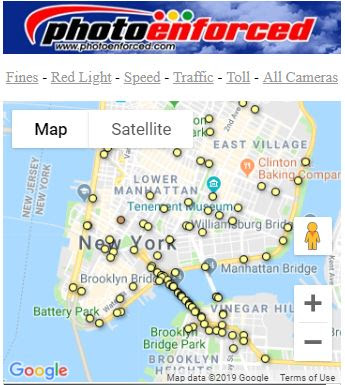
red light cameras mobile app map of speed camera locations nearbyMap of traffic cameras nearbyFind toll road camera locations nearby
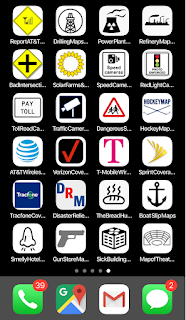
All of our maps are free mobile friendly pages that can be easily bookmarked on your phone using a Safari browser on the ihttps://www.photoenforced.com/Live-Traffic.htmlPhone and Chrome browser on an Android phone. These maps will never require a download and the home screen icon does nothing in the background unless you are using the app. Its like a shortcut to a browser but on your phone and the icon is easy to find and quick to use with no sign-in required. These maps are all advertising supported.

When you open the map it will automatically find your location and display data relevant to your area. Each map has its own unique icon depending on which data you are interested in. The default map is all cameras but you can choose speed cameras, red light cameras, traffic cameras below.

Here are details below on how to add to home screen.

How to Add Home Screen Ico

What is NAVTEQ Worth To Nokia?


Nokia purchased NAVTEQ / Nokia (NYSE: NOK) for $8.1 billion dollars in 2007 when Nokia's stock was trading upwards of $30+ dollars per share.  Now Nokia's stock is trading at less than $6 per share and sinking.  Nokia's market cap is approximately $20B with annual sales of $55B.  When Nokia purchased Navteq it had a market capitalization of $120B.  So this begs the question of how much is NAVTEQ worth to Nokia these days?  It appears that NAVTEQ will do €600 million in revenue ($1B in US dollars) in 2011 while still losing money.

With Nokia struggling to get traction in the smartphone space it makes sense that NAVTEQ could be a ripe buyout candidate from a company like Microsoft or Apple who desperately need a map platform.  NAVTEQ products embedded in just about every car that has a navigation system embedded in the car.  Overprice I must say but the car manufacturers are selling the software for thousands of dollars when Google Maps is free.   Google Maps on the other hand is free but ad support and works great for most smartphone users.  Google Maps is not as reliable as NAVTEQ for navigation but it gets the job done at a fraction of the cost.  

Popular Articles (All Time)